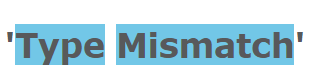
After updating Windows 10, e.g. from 1703 to 1809, the error ‘Typemismatch‘ occurs on ‘Save As’ for .sha or .dgn files in the Drawings and Reports task. The ‘Saved 0 document(s)’ message is shown after the error.
Environment
Windows 10
Resolution
Install a newer HotFix over the current Smart 3D installation, or uninstall and reinstall the product and HotFix
Cause
Registry keys under HKEY_CLASSES_ROOTAppId are deleted.



您需要登录 或注册 后才可以发表评论。