
水来财,水来财,水来财。。。
水一篇吧!!!
How to Modify Brief Properties List in Properties Window
Issue
Need to modify the Brief Properties list as displayed in the Properties window when Show Brief Properties’ is enabled. For example, need to add Item Tag property to Brief Properties list for Piping Component.
Resolution
1. In Engineering Data Editor (EDE) select the view for Piping Component.
2. Launch Edit View from EDE menu, then go to Advanced… > Layout.
3. Choose the Name ‘PipingComp-Brief/Bulk’, the Usage ‘Brief/Bulk’ or ‘Brief’ and add the property ‘Item Tag’ to the Contents. The click OK to save the changes to the view.
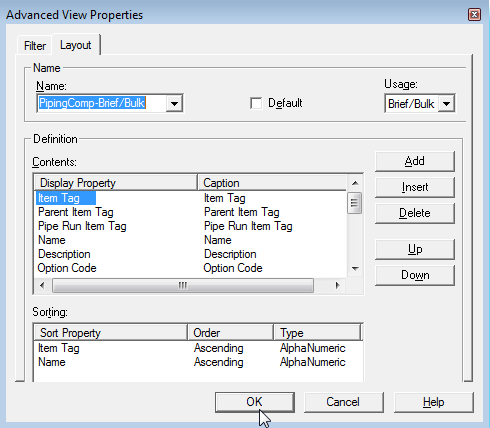
4. Now highlight a Piping Component in a drawing and toggle ‘Show Brief Properties’ to see the Item Tag.
Cause
Informational

您需要登录 或注册 后才可以发表评论。