
The Automation Toolkit contains a command – Delete Multiple Systems (ProgID: SP3DAutomation.MiscCmds01;DeleteOneByOne – no button for obvious reasons)
In the Tools -> “Edit Custom Command” dialog box, add the following Progid and Argument:
Command Progid: SP3DAutomation.MiscCmds01
Argument: DeleteOneByOne
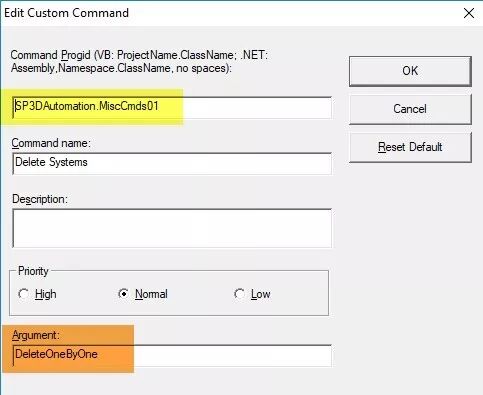
This command is useful when deleting systems which contain lots of nested objects. The normal delete command tries to delete objects in one transaction, which can take long time and possibly run out of memory. This command deletes the selected systems/runs in a scalable one-by-one fashion (bottom-to-top approach in system hierarchy), effectively deleting systems one by one. The user should follow the workflow below.
• Start with a workspace definition using a filter which only includes System tab objects.
• Select the system(s) you want to delete in the workspace explorer, right click and do select nested. (Without this it works just like normal delete command.)
• Start the command. It brings up a form which shows how many Systems / Runs are selected.
• Click Delete Selected Systems – The command reports about any objects it skipped (due to permissions / non-working status, etc.)
• Click Close to close the form.
CAUTION: DO NOT configure this command as a Custom Super Short Cut. This command is useful in very rare circumstances, and most of those are one time use cases to clean up the system hierarchy.
上文摘自smart support网站,该命令与平时操作的delete最大的不同是,这个命令每删除一个对象就执行一次,即完成一次transaction;这样就避免了大批量选中删除时候的只在最后transaction的卡顿,也避免了命令执行一半,回滚的情况。
另外,注意慎用该命令。

您需要登录 或注册 后才可以发表评论。